Redesign of the Shipments Table
Nov 2025
Nov 2025
•
•
B2B
B2B
•
•
E-commerce
E-commerce
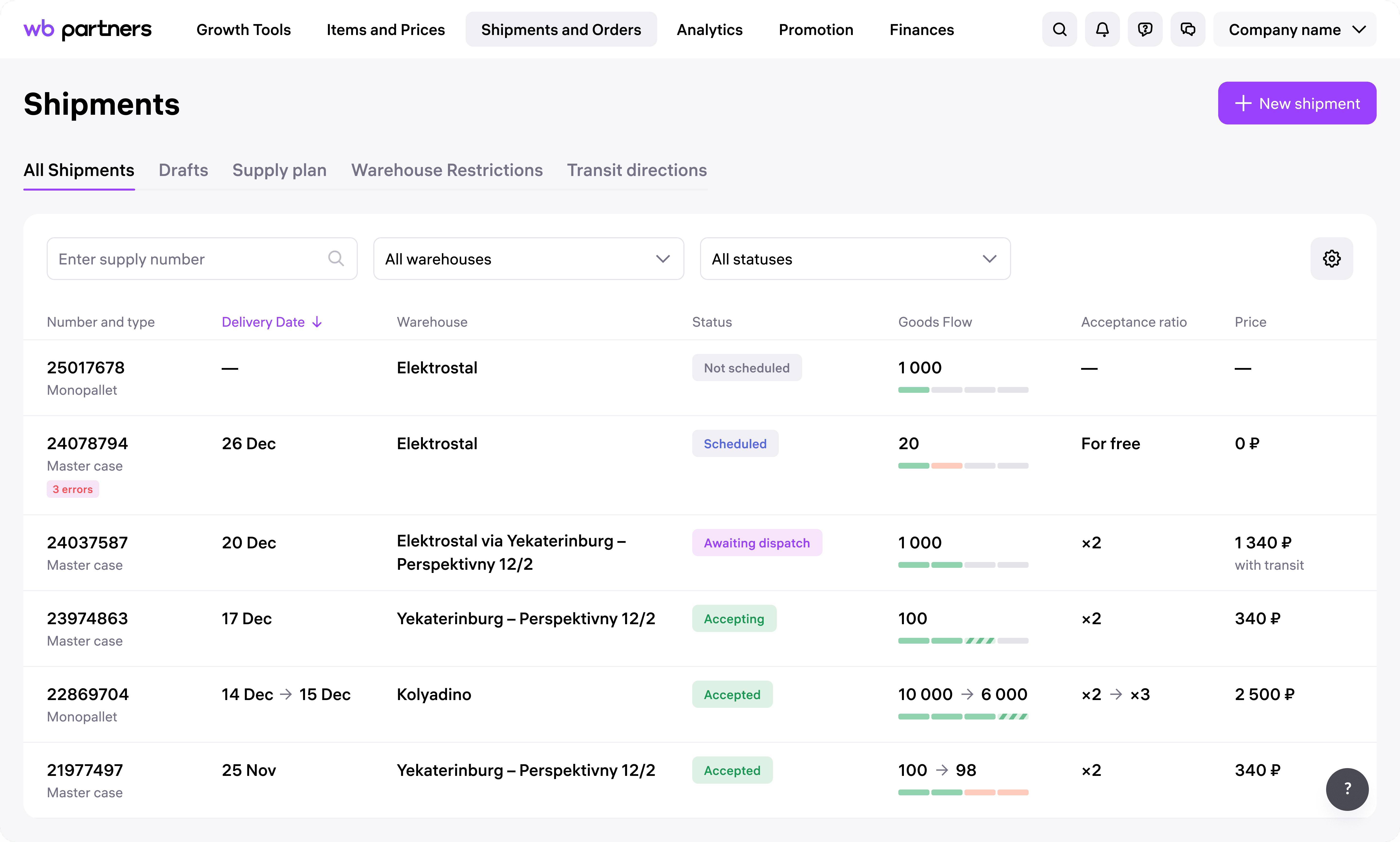
WB Partners is a service for Wildberries marketplace suppliers, where sellers manage and sell their products. To make their goods available for sale, sellers create shipments and deliver them to a warehouse.
The Shipments List displays all created shipments and helps sellers track their status, spot any issues, and understand when and where to deliver the goods
WB Partners is a service for Wildberries marketplace suppliers, where sellers manage and sell their products. To make their goods available for sale, sellers create shipments and deliver them to a warehouse.
The Shipments List displays all created shipments and helps sellers track their status, spot any issues, and understand when and where to deliver the goods
Goal
Goal
Improve the shipments table
Improve the shipments table
Problem
Problem
Users struggle with the large table — key columns are hidden behind horizontal scroll and cannot be customized
Users struggle with the large table — key columns are hidden behind horizontal scroll and cannot be customized
Before redesign
Before redesign
User Research
User Research
Together with a UX researcher, I conducted a survey to better understand what sellers expect to see in the shipments table.
Here are key insights from the survey results (as presented to the team):
Together with a UX researcher, I conducted a survey to better understand what sellers expect to see in the shipments table.
Here are key insights from the survey results (as presented to the team):
Have you experienced problems with the shipments table?
Among users who experienced issues, the main challenges were:
I kept only the most important information visible in the shipments list to reduce cognitive load and make the table easier to scan.
combined related columns — for example, shipment number, order number, and shipment type are now grouped into one concise block
replaced full-row red highlights with a small red tag showing the number of issues next to the shipment number
added a quick copy button for the shipment number to simplify communication with support
I kept only the most important information visible in the shipments list to reduce cognitive load and make the table easier to scan.
combined related columns — for example, shipment number, order number, and shipment type are now grouped into one concise block
replaced full-row red highlights with a small red tag showing the number of issues next to the shipment number
added a quick copy button for the shipment number to simplify communication with support
After a shipment is delivered to the warehouse, sellers want to track how many items have been accepted and are available for sale.
In the old version, users had to open each shipment’s detail view — the table didn’t provide enough visibility.
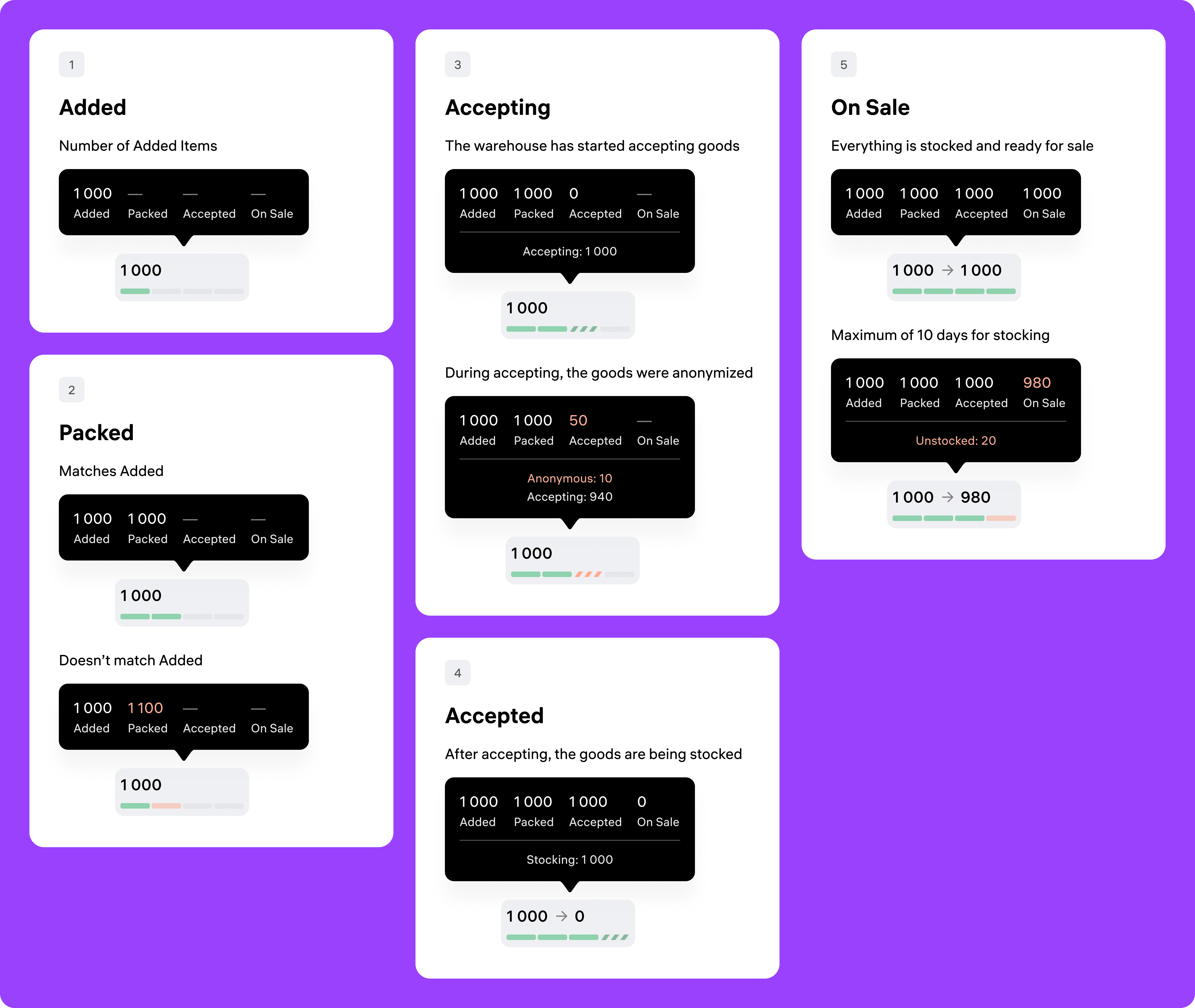
In the redesigned table, I added a «Goods Flow» cell, which clearly shows the status of items in the shipment. This gives sellers a quick overview of what’s happening with their products — without needing to click through
After a shipment is delivered to the warehouse, sellers want to track how many items have been accepted and are available for sale.
In the old version, users had to open each shipment’s detail view — the table didn’t provide enough visibility.
In the redesigned table, I added a «Goods Flow» cell, which clearly shows the status of items in the shipment. This gives sellers a quick overview of what’s happening with their products — without needing to click through
I explored and designed for all possible user scenarios, including edge cases and rare states
I explored and designed for all possible user scenarios, including edge cases and rare states
Usability Testing & Delivery
Usability Testing & Delivery
Together with a UX researcher, I ran usability testing sessions for the redesigned shipments table. The feedback was positive — no critical issues were reported by participants.
Based on the results, I added a light onboarding flow that appears on first entry after the redesign, to help users quickly adapt to the changes.
I also worked with the product manager and developers to break the implementation into 4 clear stages, making the delivery process smooth and manageable
Together with a UX researcher, I ran usability testing sessions for the redesigned shipments table. The feedback was positive — no critical issues were reported by participants.
Based on the results, I added a light onboarding flow that appears on first entry after the redesign, to help users quickly adapt to the changes.
I also worked with the product manager and developers to break the implementation into 4 clear stages, making the delivery process smooth and manageable
Results
Results
The redesign resulted in a 10-point increase in NPS, proving the interface became much clearer. By structuring complex data more logically, I also reduced the time users spend on routine shipment management
The redesign resulted in a 10-point increase in NPS, proving the interface became much clearer. By structuring complex data more logically, I also reduced the time users spend on routine shipment management